For now, we’re operating on an online-orders-only basis. Walk-ins are not available.
🚀You can now FAST TRACK your order at the checkout! Click the ‘Express Print’ button to speed up your order.
Fast Turnaround (Mon - Sat) 24 Hrs
Quick Turn Around
Countrywide Shipping
ORDER WITHIN
EST. DELIVERY
*T&C's APPLY
- Products
- Shop By Material
- General purpose
- Popular Stickers
- Echo Paper
- Durable Stickers
- Window Stickers
- Metallic Stickers
- Silver Metallic Vinyl Stickers
- Gold Metallic Vinyl Stickers
- Brushed Silver Vinyl Stickers
- Brushed Gold Vinyl Stickers
- Mirrored Gold Vinyl Stickers
- Mirrored Silver Vinyl Stickers
- Holographic Mosaic Vinyl Stickers
- Rainbow Vinyl Stickers – 4 Colors
- Glitter Vinyl Stickers
- Fluorescent Stickers
- White Waterproof Foiled Stickers
- Clear Waterproof Foiled Stickers
- White Paper Foiled Stickers
- Shop By Material
- Support
Get in touch
Use COUPON code “SS25” on checkout
Get 5% off + Free Delivery on your first order
🚀You can now FAST TRACK your order.
ORDER WITHIN
EST. DELIVERY
*T&C's APPLY
Help & Support
How to set up your artwork
The basics on how to set up your artwork correctly
Correct size
Always create your artwork to the correct size and proportion to the label you are ordering
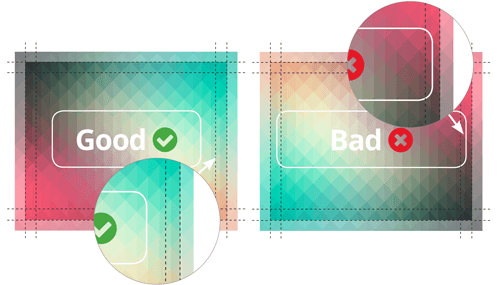
Be aware of bleed & safe zone
Artwork will need to have sufficient bleed If you are not entirely sure what the bleed means, scroll down to our bleed section where we will explain it in a bit more detail
High resolution
For best printed results, please supply your artwork at a minimum of 350dpi. Having your artwork in a PDF/Vector format would produce the best printed results, but 350dpi + will also be sufficient
CMYK
We print using a CMYK print process We have explained below what CMYK means, and how to set up your artwork in this colour mode
If you want us to check over your artwork before placing an order, please feel free to drop us an email at hello@stickershop.co.ke and we will be happy to advise
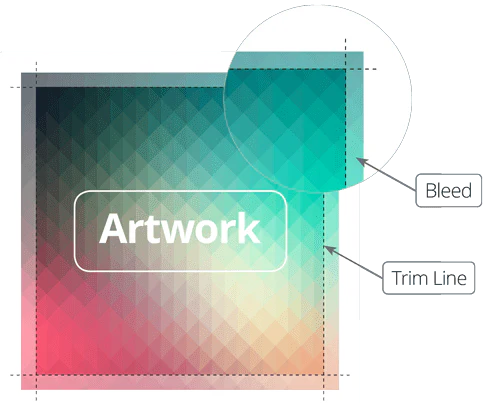
What is bleed?
Bleed is the part of your artwork that extends past the edge of the label. This is usually the background of your artwork and gets trimmed off when printing
Example: if your label size is 50mm x 50mm – set the artwork up to 56mm x 56mm (3mm on each side)
What is safe zone?
The safe zone is the ‘no cross’ zone at the edge of the label. We recommend that you keep all text/borders/important stuff within the safe zone boundaries. This will ensure that nothing gets cut off during print.

Color
We print using CMYK. Occasionally, artwork is set up using the RGB colour mode. You will be able to see the slight difference below.
RBG & CMYK, What is the difference?
RGB is a colour mode that is made up of Red, Green & Blue light. It is used in screens and therefor backlit producing bright vibrant colours. This method of printing isn’t available using a digital press, however we will always print the closest CMYK equivalent.
CMYK is the colour mode that we use to print – This is most common in digital print methods; the colours are made up from Cyan, Magenta, Yellow and Black. As you can see from the example above, some of the brighter colours are not always achievable.
File format
If you don’t have your artwork in any of these file formats, don’t panic! We may be able to use it, just drop us an email & attach your artwork and will we advise.
Resolution
We require your artwork to be a minimum of 350dpi for best printed results.
350dpi – As you can see the artwork is crisp and clear. This will produce high quality printed results.
72dpi – Very low resolution & pixelated. This will not produce good printed results.
For any artwork with text, we recommend it to be at least 6pt. Use vector PDF whenever possible for the best results
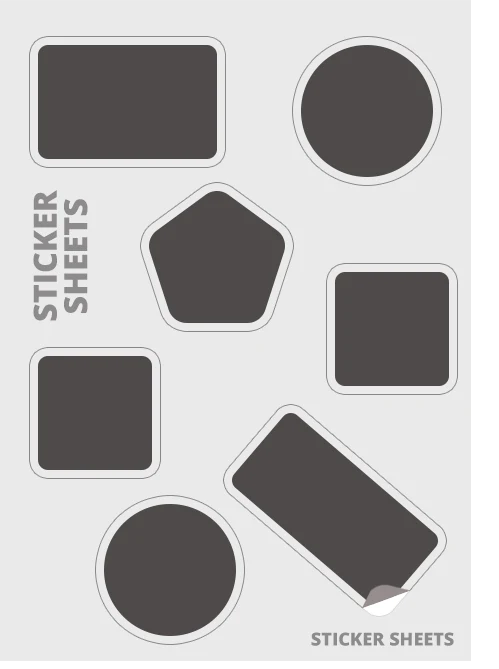
How to set up sticker sheets
We recommend setting up your sticker sheets yourself, to ensure you are happy with how they look
Otherwise, our artwork team will be able to add the cut paths when we come to proof your order.
Cut paths must be set at least 2mm away from the edge of your sticker or at least 2mm inside your artwork so there is a bleed.
If you would like us to check your artwork before placing an order, feel free to email your artwork to hello@stickershop.co.ke, and we would be happy to advise.